

A Weighted Grade Calculator helps students determine their overall academic performance by considering the different percentages assigned to exams, homework, quizzes, projects, and other coursework. Unlike a simple average, a weighted grade reflects how much each assignment or category contributes to the final result.
For students who want to understand their current standing, estimate their final grade, or determine what score they need on an upcoming exam, this tool can make the process much easier. Instead of spending time on manual calculations, students can use a calculator to organize their grades and plan their studies more effectively.
This guide explains how weighted grades work, how to calculate them in three easy steps, and how to use the results to make informed academic decisions.
What Is a Weighted Grade Calculator?
A weighted grade calculator is a tool that calculates a course grade by assigning different levels of importance to individual assignments or grading categories.
For example, a teacher might assign 20% of the overall grade to homework, 15% to quizzes, 25% to a midterm exam, and 40% to a final exam. In this grading system, the final exam has a greater influence on the course grade than homework because it carries a higher percentage weight.
The calculator considers each category’s grade and its assigned weight to determine the weighted average.
This approach helps high school students, college students, and other learners understand how their performance across different assessments affects their overall grade.
Why Are Weighted Grades Important?
Not every assignment contributes equally to academic performance. A short quiz might account for only 5% of a course grade, while a major project or final exam could represent 30% or more.
Understanding these differences helps students:
- Calculate their current class grade.
- Estimate their final grade before the semester ends.
- Identify the assignments that have the greatest impact on their results.
- Determine the grade needed on the final exam to achieve a target grade.
- Focus their study time on the most important assessments.
- Track their progress throughout the course.
A weighted grade calculator makes these calculations easier and helps students avoid grade surprises at the end of a course.
How to Use a Weighted Grade Calculator in 3 Easy Steps
Calculating a weighted grade does not have to be complicated. The process involves identifying the grading weights, entering the relevant grades, and calculating the weighted average.
Step 1: Find the Grades and Category Weights
The first step is to collect the student’s grades and determine how much each assessment contributes to the final course grade.
This information is usually available in the course syllabus, grading breakdown, gradebook, school portal, or learning management system. If the grading policy is unclear, the student can ask their teacher or instructor for clarification.
Common grading categories include:
- Homework
- Quizzes
- Tests
- Midterm exam
- Final exam
- Projects
- Labs
- Papers and essays
- Class participation
Each category has a specific category weight. For example, homework might account for 15% of the course grade, quizzes for 10%, tests for 25%, projects for 20%, and the final exam for 30%.
Before calculating the result, the student should confirm that the weights add up to 100%.
If the grading system uses points instead of percentages, the student may first need to calculate each category average by dividing points earned divided by points possible. The resulting decimal can then be converted to a percentage.
For example, a student who earns 45 points out of 50 has a percentage grade of 90%.
Important: Some courses calculate category averages differently, including dropping the lowest score or weighting assignments individually. The calculator should match the grading policy used by the course.
Step 2: Enter the Grades and Their Weights
After collecting the necessary information, the student enters each grade and its corresponding weight into the weighted grade calculator.
For example, consider a course with the following grading breakdown:
| Grading Category | Student’s Grade | Category Weight |
|---|---|---|
| Homework | 85% | 15% |
| Quizzes | 90% | 10% |
| Midterm exam | 78% | 25% |
| Projects | 92% | 20% |
| Final exam | 88% | 30% |
| Total | 100% |
In this example, the student’s performance varies across the categories. The homework grade is 85%, while the project grade is 92%.
However, the final course grade depends on both the student’s performance and the importance assigned to each category.
A calculator can process these values automatically. When using an interactive free online tool, the result may update as you type, allowing the student to see the grade instantly without repeating the calculation manually.
Before continuing, the student should check that each grade matches the gradebook and that every category has the correct weight.
Step 3: Calculate the Weighted Average
The final step is to calculate the weighted average by multiplying each grade by its weight and adding the results together.
The general weighted grade formula is:
Weighted Grade = Σ (Grade × Weight)
When weights are entered as percentages, each weight must be converted into a decimal before multiplication.
For example:
- Homework: 85 × 0.15 = 12.75
- Quizzes: 90 × 0.10 = 9.00
- Midterm exam: 78 × 0.25 = 19.50
- Projects: 92 × 0.20 = 18.40
- Final exam: 88 × 0.30 = 26.40
Next, add the results together:
12.75 + 9.00 + 19.50 + 18.40 + 26.40 = 86.05%
The student’s weighted course grade is therefore 86.05%.
This calculation assumes that all five categories are included, the final exam grade is already available, and the weights total 100%.
When the weights add up to 100%, the weighted grade can be calculated directly using decimal weights. If the available weights do not total 100%, the calculation may need to account for the total weight or the course’s rules for missing categories.
A weighted grade calculator performs these calculations quickly, reducing the chance of arithmetic mistakes.
What Is the Weighted Grade Formula?
The weighted grade formula determines how individual grades contribute to an overall result. It is particularly useful when assignments, exams, and other categories have different levels of importance.
The Basic Formula
When category weights are expressed as percentages that total 100%, the formula is:
Weighted Grade = (Grade₁ × Weight₁) + (Grade₂ × Weight₂) + … + (Gradeₙ × Weightₙ)
The weights are expressed as decimals in this version of the formula.
For example, a grade of 80% in a category worth 20% contributes 16 percentage points to the final result.
The calculation is:
80 × 0.20 = 16
This means that the category contributes 16 points toward the weighted course grade.
When the Total Weight Is Not 100%
Sometimes, a student wants to calculate a grade before the final exam or when only some categories have been graded. In these situations, the completed categories might account for less than 100% of the course.
If the goal is to calculate the average across the graded categories alone, the formula is:
Weighted Average = Sum of (Grade × Weight) ÷ Sum of the Weights
In this case, the student should multiply each grade by its weight, add the results together, and divide by the total weight.
For example, suppose a student has completed two categories:
| Category | Grade | Weight |
|---|---|---|
| Homework | 80% | 20% |
| Quizzes | 90% | 30% |
The weighted contributions are:
- Homework: 80 × 20 = 1,600
- Quizzes: 90 × 30 = 2,700
The total weighted contribution is 4,300, and the sum of the weights is 50.
The weighted average across the completed categories is:
4,300 ÷ 50 = 86%
The student has an 86% average across those graded categories.
However, this is not necessarily the final course grade. If the remaining categories have not yet been graded, the student’s overall grade can change.
A calculator should clearly distinguish between a running average across completed work and a final grade calculated using the entire course’s grading breakdown.
Weighted vs. Unweighted Average: What Is the Difference?
A weighted average and a plain average use different methods to calculate results.
An unweighted average treats every grade equally. A weighted average gives each grade a level of importance based on its assigned weight.
Consider a student who receives the following three grades:
- Homework: 80%
- Quiz: 90%
- Final exam: 70%
Unweighted Average
The unweighted average is calculated by adding all three grades and dividing by three.
(80 + 90 + 70) ÷ 3 = 80%
Weighted Average
Now suppose homework counts for 20%, the quiz counts for 20%, and the final exam counts for 60%.
The calculation becomes:
- Homework: 80 × 0.20 = 16
- Quiz: 90 × 0.20 = 18
- Final exam: 70 × 0.60 = 42
The weighted grade is:
16 + 18 + 42 = 76%
Although the plain average is 80%, the weighted average is 76% because the final exam has a greater influence on the result.
Neither calculation is inherently better in every situation. The correct method depends on the course’s grading policy.
How to Calculate a Grade Before the Final Exam
Many students want to know their grade so far before taking the final exam. This helps them understand their current academic standing and prepare for the remaining coursework.
To calculate a grade before the final, the student needs the grades and weights for the completed categories.
For example, suppose the completed categories contribute 70% of the course grade, and the student has a weighted average of 84% across those categories.
The contribution toward the final course grade is:
84 × 0.70 = 58.8 percentage points.
This means the completed work contributes 58.8 points toward the final grade.
The remaining 30% comes from the final exam.
If the student earns 90% on the final exam, its contribution will be:
90 × 0.30 = 27 percentage points.
The final course grade will be:
58.8 + 27 = 85.8%
This example shows why a grade before the final is not necessarily the same as the final course grade.
Students should check whether their gradebook displays a weighted average for completed work or a running total that includes ungraded categories.
How to Calculate the Grade Needed on the Final
A weighted grade calculator can also help students estimate the grade needed on the final exam to reach a desired grade.
The calculation requires three values:
- The weighted contribution from completed coursework.
- The weight assigned to the final exam.
- The target grade for the course.
The formula is:
Required Final Exam Grade = (Target Grade − Current Weighted Contribution) ÷ Final Exam Weight
The final exam weight must be expressed as a decimal.
For example, suppose a student has earned 58.8 percentage points from completed coursework, the final exam is worth 30% of the course grade, and the desired grade is 85%.
The calculation is:
(85 − 58.8) ÷ 0.30 = 87.33%
The student would need approximately 87.34% on the final exam to reach an overall grade of 85%, assuming the grading system uses these weights and does not apply additional rules.
If the required score is higher than 100%, the target grade may not be mathematically achievable through the final exam alone. In that case, the student can review the remaining assignments, check for extra credit, or discuss available options with the instructor.
How Missing Assignments and Ungraded Categories Affect the Result
Missing assignments and ungraded categories can make a student’s current grade difficult to interpret.
A blank grade in the gradebook does not always mean the same thing as a zero. Some instructors leave an assignment blank until it has been graded, while others apply a zero when an assignment is missing or overdue.
Students should check the grading policy before treating a missing score as zero.
A weighted grade calculator is most useful when it reflects the actual rules of the course, including:
- Whether missing work receives a zero.
- Whether ungraded categories are excluded from the current average.
- Whether the instructor can drop the lowest score.
- Whether extra credit is included in the calculation.
- Whether category averages are weighted individually or by points earned.
For instance, if a student has a missing quiz worth 10% of the final grade, treating it as zero may significantly lower the calculated result. Excluding it from the calculation may produce a higher running average, but that figure could be misleading if the course ultimately counts the missing work as zero.
The student should confirm how the course handles these situations before relying on the result.
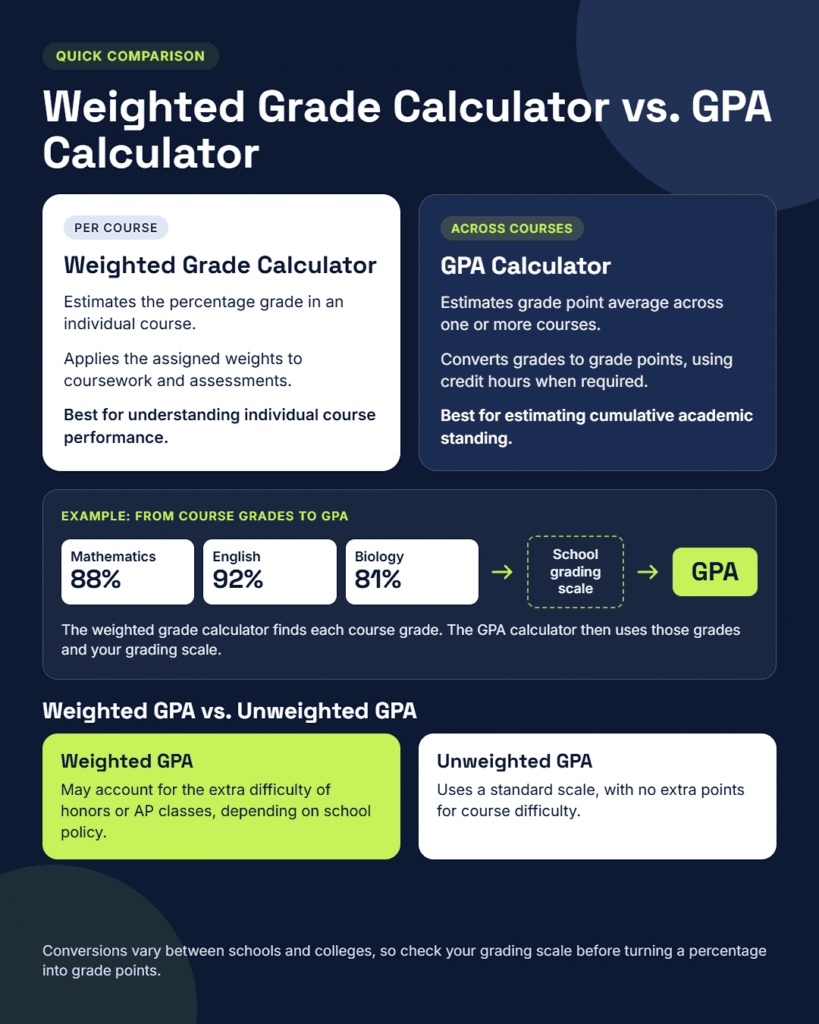
Weighted Grade Calculator vs. GPA Calculator
A weighted grade calculator and a GPA calculator serve related but different purposes.
A weighted grade calculator estimates the percentage grade in an individual course by applying the assigned weights to coursework and assessments.
A GPA calculator estimates a student’s grade point average across one or more courses, usually by converting letter grades or percentage grades into grade points and accounting for credit hours when required.
For example, a student might earn 88% in mathematics, 92% in English, and 81% in biology. A weighted grade calculator can determine each course grade based on its grading categories.
A GPA calculator, by contrast, uses the resulting course grades and the institution’s grading scale to estimate the student’s GPA.
Weighted GPA vs. Unweighted GPA
A weighted GPA may account for the additional difficulty of certain courses, such as honors or advanced placement classes, depending on the school’s policy.
An unweighted GPA generally uses a standard scale without extra points for course difficulty.
The exact conversion varies between schools, colleges, and educational systems. Therefore, a percentage grade should not be converted into grade points without checking the relevant grading scale.
Students should use a weighted grade calculator to understand individual course performance and a GPA calculator when they need to estimate their cumulative academic standing.
Who Can Benefit From a Weighted Grade Calculator?
A weighted grade calculator can be useful for several groups of people.
High School Students
High school students can use the calculator to understand how homework, tests, projects, and exams affect their class grade. It can also help them plan their study schedule during exam season.
College Students
College students often manage multiple courses with different grading systems. A calculator can help them estimate their course grade, monitor their semester performance, and identify the assessments that deserve additional preparation.
Teachers
Teachers can use weighted grade calculations to verify grading breakdowns, check category averages, and explain how assessment weights affect students’ results.
Parents
Parents can use a weighted grade calculator to better understand a student’s progress and discuss academic goals. It can provide a clearer picture of how individual assessments contribute to the overall grade.
The same method can be useful in middle school when a teacher assigns different weights to homework, quizzes, tests, and projects.
Tips for Improving a Course Grade
Calculating a grade is only the first step. Students can use the result to make better decisions about their remaining coursework.
Focus on the Highest-Weight Category
The highest-weight category often has the greatest influence on the final result. If the final exam accounts for 40% of the course grade, improving exam performance may have a greater effect than improving a small homework category.
However, the best strategy depends on the student’s current grades and the amount of improvement realistically available in each category.
Review Remaining Assignments
Students should identify remaining assignments and determine how much each one contributes to the course grade.
Completing missing homework, preparing for upcoming quizzes, and submitting projects on time can all contribute to a stronger overall result.
Check for Extra Credit
Some instructors offer extra credit opportunities that can improve a student’s grade. The effect depends on how the extra credit is calculated and whether the grading policy permits it.
Students should confirm the rules before including extra credit in their estimates.
Track Progress Regularly
Checking grades throughout the semester helps students recognize changes in performance before the final assessment.
A calculator can support this process by making it easier to compare different scenarios, estimate a target grade, and plan the semester with greater confidence.
The goal is not simply to chase a higher number. It is to understand academic progress and make informed decisions about studying.
Frequently Asked Questions
1. What Is a Weighted Grade Calculator?
A weighted grade calculator is a tool that estimates a course grade by considering the percentage assigned to each grading category. It accounts for the relative importance of homework, quizzes, exams, projects, and other assessments.
2. How Is a Weighted Grade Calculated?
A weighted grade is calculated by multiplying each grade by its corresponding weight, adding the weighted results together, and applying any required normalization if the weights do not total 100%. When the weights total 100%, the calculation is straightforward using decimal weights.
3. Can a Weighted Grade Calculator Estimate the Final Exam Score Needed?
Yes. If the current weighted contribution, final exam weight, and target grade are known, the calculator can estimate the score needed on the final exam to reach the desired course grade.
4. What Happens if the Weights Do Not Add Up to 100%?
The correct calculation depends on the reason the weights do not total 100%. If only completed categories are being considered, dividing the weighted sum by the sum of those weights produces an average across completed work. If the course’s full grading breakdown is incomplete or inconsistent, the student should verify the weights before calculating the final grade.
5. Is a Weighted Grade the Same as a GPA?
No. A weighted grade generally represents a percentage-based result for a course, while GPA represents an average of grade points across courses. Some schools also use weighted GPA systems that account for course difficulty.
6. Can a Weighted Grade Calculator Help Improve Academic Performance?
A calculator cannot directly improve a student’s grades, but it can show which assessments contribute most to the final result. Students can use that information to prioritize studying, monitor progress, and prepare for upcoming assignments and exams.
Conclusion
A weighted grade calculator provides a practical way to understand how different assignments contribute to a course grade. By identifying category weights, entering accurate scores, and applying the weighted grade formula, students can calculate their current average and estimate their final result.
The three-step process also helps students understand the difference between a running average and a final course grade. With accurate information from the syllabus or gradebook, they can estimate the score needed on an upcoming exam, identify important remaining assignments, and plan their study time more effectively.
Whether used by high school students, college students, teachers, or parents, a weighted grade calculator makes grade calculations easier to understand and helps turn academic results into useful information for future planning.